Ping Pong Tanks: what you build and how you proceed
You build Ping Pong Tanks in Unity from your own Game Design Document (GDD), the document that says what the game is and how a round plays out: a tank arena where two players share one keyboard, fire bouncing shells through a generated maze and grab power-ups. On 4 December the client gets version 1.0, the minimum viable product (MVP), which anyone at school can download and start from your written guide.
You decide how each feature is built, write the expected result of every test before you play, and keep all your work in the public repository. The Unity version, the licence, the release channel and your public name are agreed with your instructor, not decided by you or by AI.
How to use the weekly guide
Read how the week connects to the whole project, and the week goal.
Do the week's work steps in order. The first unfinished work step is open. Tick a part as soon as you have done it: a tick is your own memory, not a submission.
When a work step changes the game, do each change as a GitHub issue and work through it with the six steps on the Way of working page. One work step can need several issues.
Do the end-of-week check. Write the three project journal fields, download the whole journal and commit it as project-docs/project-journal.md, replacing the old file.
Work step is one numbered item in this site's weekly guide. GitHub issue is a numbered task card in your repository for one change to the game, usually half a day to a day of work, closed by the commit that finishes it. Working method is the six steps on the Way of working page (pick, plan, build, test, save, record) that you repeat for every issue.
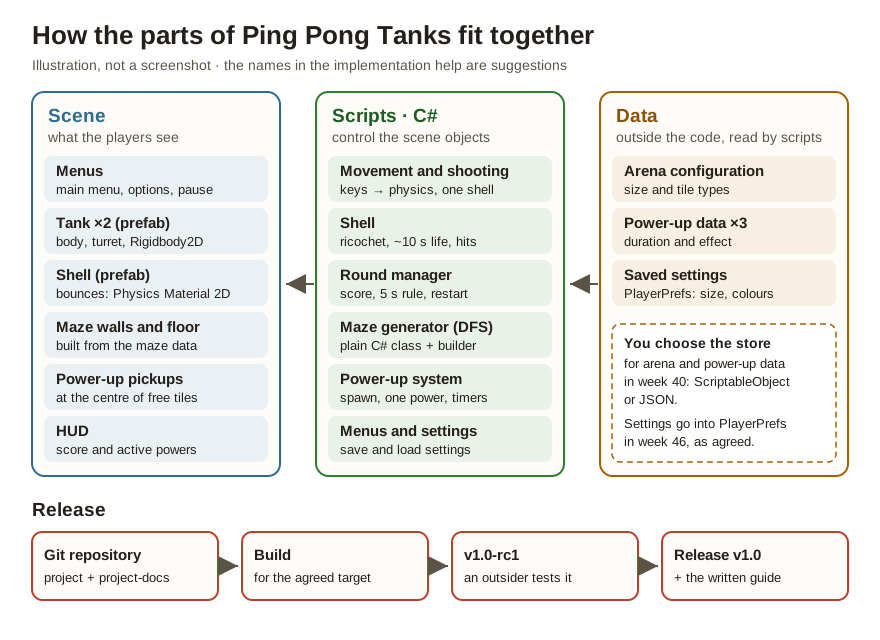
Start from week 36 →Game parts and toolsIllustration of how the game's parts fit together. It is not a screenshot of the finished game.
Unity project (the agreed version)
Scenes, prefabs and scripts live in Assets/ at the repository root. A prefab is a Unity object saved as a reusable template: the tank, the shell and the power-up pickup. Builds, the packaged runnable versions of the game, do not go into Git.
C# scripts
Movement, shooting, rounds, the maze generator, the power-up system and the menus. You write the game's code yourself. The script names in the implementation help are suggestions.
Unity 2D physics
Rigidbody2D, Collider2D and Physics Material 2D do the movement, the collisions and the ricochets. Moving objects past the physics breaks the ricochet, so it is used from week 37 on.
Data outside the code
The arena configuration and the power-up data are data, not if branches in code. You compare ScriptableObject, a JSON file and PlayerPrefs in week 40 and choose the store for both; JSON is a plain-text data format that people and programs can both read. Player settings go into PlayerPrefs in week 46, as agreed. If the week 40 comparison clearly favours another store for them, agree the change with your instructor before week 46.
Git, GitHub Desktop and GitHub
A public repository: the Unity project, the issues and the milestone "MVP 4 Dec", small commits, pull requests from week 44 on, and the release. .gitignore keeps Library/, Temp/ and builds out of Git. Installing GitHub Desktop, signing in, committing and pushing with pictures: GitHub Desktop picture guide.
Build and release
A Windows build or the target agreed with your instructor. Release candidate v1.0-rc1 in week 47, and v1.0 in week 48 as a GitHub Release or on itch.io, as your instructor decides.
Graphics and sound
Simple graphics you draw yourself: a square body, a round turret and tile textures. Sprite packs only with the source and the licence in a CREDITS file. Sound only if the week 43 prioritisation picks it.
AI
May explain error messages, unpack Unity concepts and suggest test cases. The game's code, the game design decisions and the test results are yours. Every significant use goes into the AI log.
Where do I write what?
The brief (on this site)
The client's requirements, the required core and what stays out of scope. Check here what must be built.
Your GDD project-docs/gdd.md
What the game is and how it plays. You do not rewrite it. If a rule changes, for example player 2's fire key after a playtest, record the change in the GDD and in the plan.
Implementation plan project-docs/gdd-implementation-plan.md
Your decisions and the instructor's, with reasons: the MVP goal, the P0 scope, the data store, the game team and the open items. Fill it in on the Plan page, download it and commit it.
GitHub issue
One change to the game: what to do and its done-when condition. The commit that finishes it closes it. The milestone "MVP 4 Dec" groups the required issues. What the weekly meeting agrees is always recorded on the issues it concerns.
Test matrix project-docs/tests.md
Every test case, numbered T01, T02 and so on: the expected result written before the run, the actual result, the fix and the retest.
Debugging chains project-docs/chains/
One file per real bug: observation, reproduction steps, cause, fix commit, retest and regression test.
Notes project-docs/meetings/ and project-docs/reviews/
A meeting note meetings/weekNN.md only in weeks where a work step asks for one, the playtest notes, and the review notes with the client's own words. People appear only by role, for example instructor, tester A or game team member B. If your instructor needs names or someone's exact words, send them in Teams.
Project journal project-docs/project-journal.md
Once a week: what you did and how, why, and exactly where the work is. You write it on this site, download it and commit it. The repository is public, so no personal data goes into the journal.
AI log
Significant AI use: what you asked, what you used, changed or rejected, and how you checked it.
README and the install guide
For players: download, launch, controls and rules. User documentation and project documentation are separate files and are not mixed.
Record a result where it belongs right away: a test result in tests.md, a finished change in its issue and commit. The journal summarises the week and points to these places. The ticks and fields on this site are stored only in this browser: the evidence always lives in the repository.
Requirement, suggestion or your decision?
Requirement comes from the brief or from your GDD's rules, and it must be built: two players on one keyboard, one shell per tank with endless ricochets and about ten seconds of life, the five-second rule, a new generated maze every round, power-ups that the players can see, a menu path and a v1.0 that a stranger can start from the guide. The features are sorted into three priority levels in week 36. P0 is the required core: it must be finished, or there is nothing to hand over. P1 is important follow-up content, built only once P0 works. P2 is optional extra that can be left out.
Agreed implementation is fixed: Unity and C#, Unity's 2D physics, a public GitHub repository with issues and small commits, feedback changes on a branch through a pull request, and data kept outside the code. Player settings go into PlayerPrefs in week 46, as agreed. If the week 40 comparison clearly favours another store for them, agree the change with your instructor before week 46. Suggestion is a starting point from this site, such as the folder structure and the script names in the implementation help. You may do it another way if you record why.
Your decision is justified in the plan or in the journal, for example the store for arena and power-up data (week 40), how you measure the spawn distance, how you build the five-second rule, and whether the menu is its own scene or an overlay. Agreed with your instructor are the Unity version, the licence, the release channel and your public name, plus the approval of the P0 scope in week 36 and of the prioritisation in week 43. An empty field in the plan is the right answer until the item has been agreed.
This is a game project, not a competence demonstration, so there is no evidence matrix on this site. Your implementation is judged against the brief and your own GDD. What counts is the engineering, not how fun the game is: code you can explain, test cases with the expectation written before the run, three complete debugging chains, a history of small commits and a release that a stranger can start.
You build the game alone, but the game team (you, two classmates and your instructor) makes the teamwork visible: the weekly meetings, the playtests, the debugging pair and the prioritisation. The client, your instructor, plays the game in the week 43 review, an outside tester tries the release candidate in week 47, and you hand the MVP and the project documentation over on Friday 4 December.
Remember: the tick boxes and text fields on this site are your own working memory. They are stored in this browser only and they do not reach your instructor. A tick is not a submission. Tick a box once the work has been tested and is in the Git repository.
What are the printable work pack and the original Word template for?
The printable work pack is a schedule and a checklist for situations where this page is not open. You do not need to write the same answers into it again.
The original Word template is the source material for this path. Its topics have been moved into the weekly work steps and the project journal on this site. Fill in the Word template separately only if your instructor gives you a specific instruction to do so.
Your own state in this browser
Ticks, project journal, plan and AI log are stored only in this browser.
Instructor's source material (in Finnish) · nothing here needs filling in without a separate instruction
These are the instructor's source documents. You do not fill them in without a separate instruction. The weekly work steps and the project journal cover the same content.
I have read your Game Design Document for Ping Pong Tanks, and I am commissioning exactly the game it describes: a fast top-down tank arena for two players on one keyboard. My terms are simple. I am not buying a promise, I am buying a working build with its test log. Two players, one keyboard, and the tanks must feel responsive from the first week. I expect the game to be playable at the end of every single week — a little better each time — and the whole project to live in a public GitHub repository I can open whenever I want.
The design lives or dies on its core loop, so follow the GDD's own rules to the letter: one shell per tank, endless ricochets, roughly ten seconds of life, and no point awarded if both tanks die within five seconds of each other. The bouncing shell is the soul of this game — if the ricochet feels wrong, nothing else matters. A round of Ping Pong Tanks should take seconds, not minutes — quick deaths, quick restarts. Randomly generated mazes are what keep the matches fresh — no two rounds should look the same. And chaotic power-ups keep every match fresh — but the player must always see who has what.
I will not wait until December to see the game. Halfway through, I want to see the game and decide with you what actually fits before the deadline — the GDD holds more ideas than thirteen weeks can carry, and cutting together is part of the job. When I give feedback, act on it in a branch and show me the merge: feedback only counts when I can point at the commit that answers it. When you tell me the game is chaotic but fair — that balance is proven with a test log, not with a feeling.
The Minimum Viable Product (MVP) — the smallest version of the game that contains the required playable core — is due on Friday 4 December 2026. Keep the user interface out of the way: low clutter — menus should get the players into the match, not stand in their way. Before you call it released, hand the build to someone outside the project on another machine: if a stranger cannot start the game from your written instructions alone, it is not released — it is just on your machine. Version 1.0 means I can hand the link to anyone at school and it just works. After that, the last week belongs to the handover — in the final week you are not building the game anymore, you are proving what you know.
Who is the client? The client in this brief is your instructor, who commissioned the game. Your instructor receives your question list in week 36 and plays the game as the client in the week 43 review.
How to read the cards below
Requirement: the client's wish in this brief or a rule in your GDD. It must be built.
Agreed implementation: the tools and the way of working that are fixed for the whole project.
Suggestion: a starting point from this site, for example the script names in the implementation help. You may replace it if you record why.
Your decision: you choose it and write the reason into the plan or the journal.
Agree with your instructor: you do not decide it yourself or with AI.
Agreed implementation
Unity (the version is locked with your instructor in week 36 — the GDD's "Unity 5" gets checked) and C#, 2D physics with Unity's own Rigidbody and Collider components. A public GitHub repository, work tracked as issues and small commits. Feedback changes are built on their own branch and merged through a pull request (PR) — see week 44. Arena and power-up data is kept outside the code. Your decision: the store for arena and power-up data, which you compare and choose in week 40. Player settings go into PlayerPrefs in week 46, as agreed. If the week 40 comparison clearly favours another store for them, agree the change with your instructor before week 46.
Priority levels. P0 is the required core: the features that must be finished, or there is nothing to hand over. P1 is important follow-up content that gets built only once P0 works, and P2 is optional extra that can be left out.
Requirement · P0 for this project: a two-player match, a bouncing shell, rounds and scoring with the 5 s rule, a procedurally generated 10×10 maze that is new every round, three power-ups, a menu path and a released v1.0. Released as a GitHub Release (or on itch.io — the instructor decides).
Requirement · hold the scope
These are NOT built without the week 43 prioritisation decision: homing missile, cluster bomb, laser, triple shot, special tiles (water, smoke, one-way, portal), the Forest and Snow themes, sound and music, merged power-ups and online play. They are in the GDD — they are not in the MVP; they stay on the P1 and P2 lists. Three half-finished features are worse than one finished one.
Agree these with your instructor
You do not decide these yourself and you do not decide them with AI. An empty field in the plan means "open item", and that is the correct answer until your instructor has answered:
Which Unity version is locked for the whole project?
Which licence goes into the repository (LICENSE), and where do the sounds come from if audio is chosen?
Is it released as a GitHub Release or on itch.io?
Under which name do you appear in the public repository — and is guardian consent needed?
Your instructor also approves the P0 scope in week 36 and the prioritisation decision in week 43.
Graphics, sound and libraries
Suggestion: the GDD keeps the graphics simple: a square body, a round turret, tile textures — draw them yourself in Unity or an image editor. Requirement: if you use sprite packs (Kenney, OpenGameArt), record the source and the licence in a CREDITS file. Sound only if the prioritisation picked it, sources with licences. AI does not produce P0 code and it does not make game design decisions — it may explain errors and suggest tests, and significant help goes into the AI log.
Keep the thread visible
Brief → issue → done-when → test → work in the repo
From the brief
a working build with its test log
Issue
#14 Shell despawns after 10 s
Done when
the shell disappears after 10 s, also while ricocheting
Test and commit
test case T05 in tests.md + a commit whose message references the test
Working method · one GitHub issue at a time
Six steps, every time
This is the working method for one change to the game. The weekly guide tells you which work steps to do this week. Inside a work step that changes the game, repeat these six steps for every GitHub issue, then go back to the work step and tick its parts.
1Pickone GitHub issue from the top of the backlog
2Planread the GDD section and the GitHub issue
3Buildone piece at a time
4Testplay it and record the result
5Savecommit and push
6Recordwhat you produced and learned
Rule of thumb: if you cannot explain the change, the work is not finished.
Open only the current week. Read how the week connects to the whole project and the week goal, do the work steps in order, then do the end-of-week check and fill in the week's project journal.
Weekly meeting: on Mondays, 15 minutes with the game team. Record what you agree on the GitHub issues it concerns; that is always the primary place. Write a separate project-docs/meetings/weekNN.md only in weeks where a work step asks for one. In the repository, people appear only by role, for example instructor or game team member B.
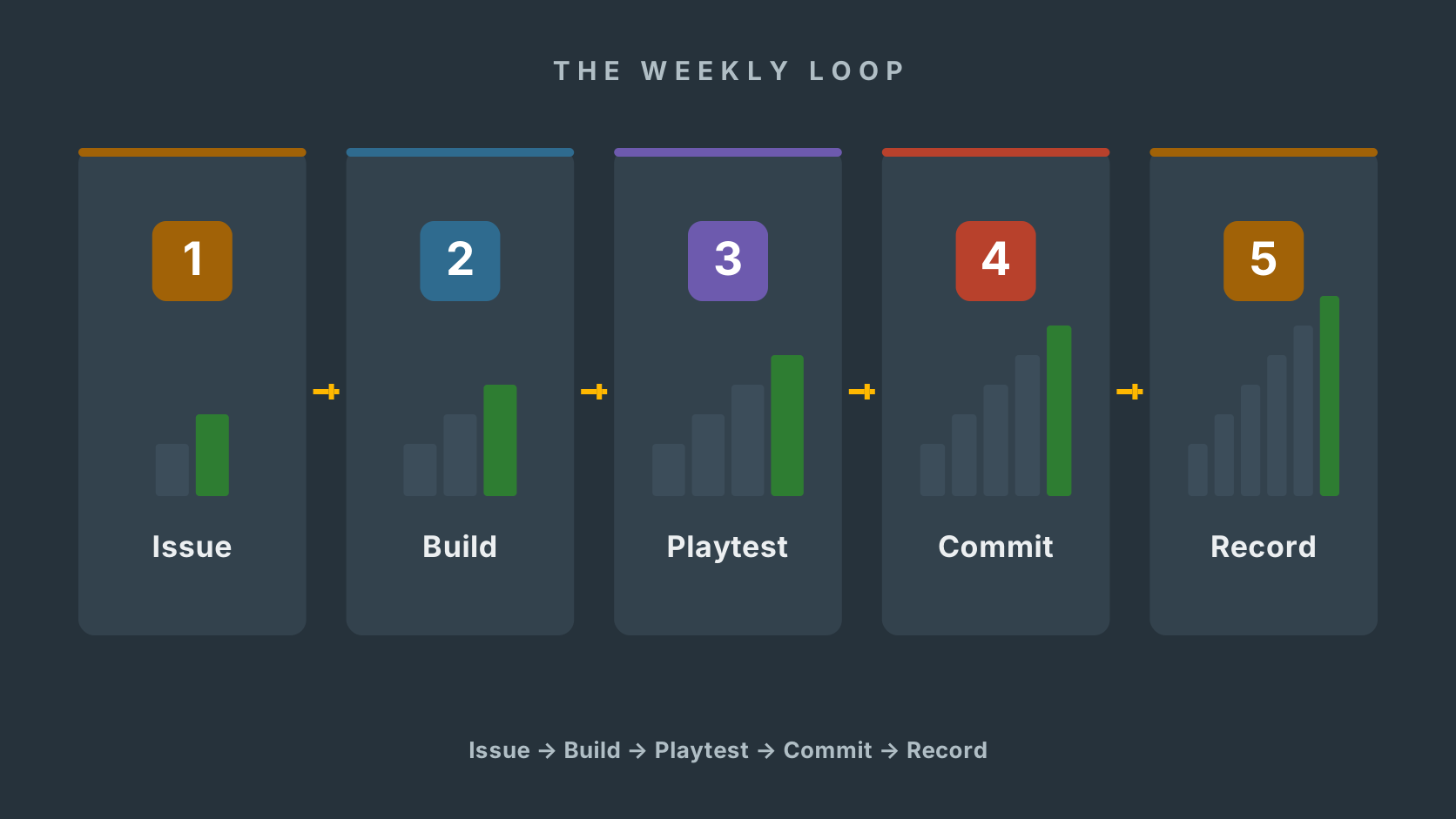
The weekly loop is the same six steps, done once for every issue. The issue holds the pick and the plan, then you build, playtest, commit and record. A feature is not done when it works — it is done when it has been tested, committed and written up.
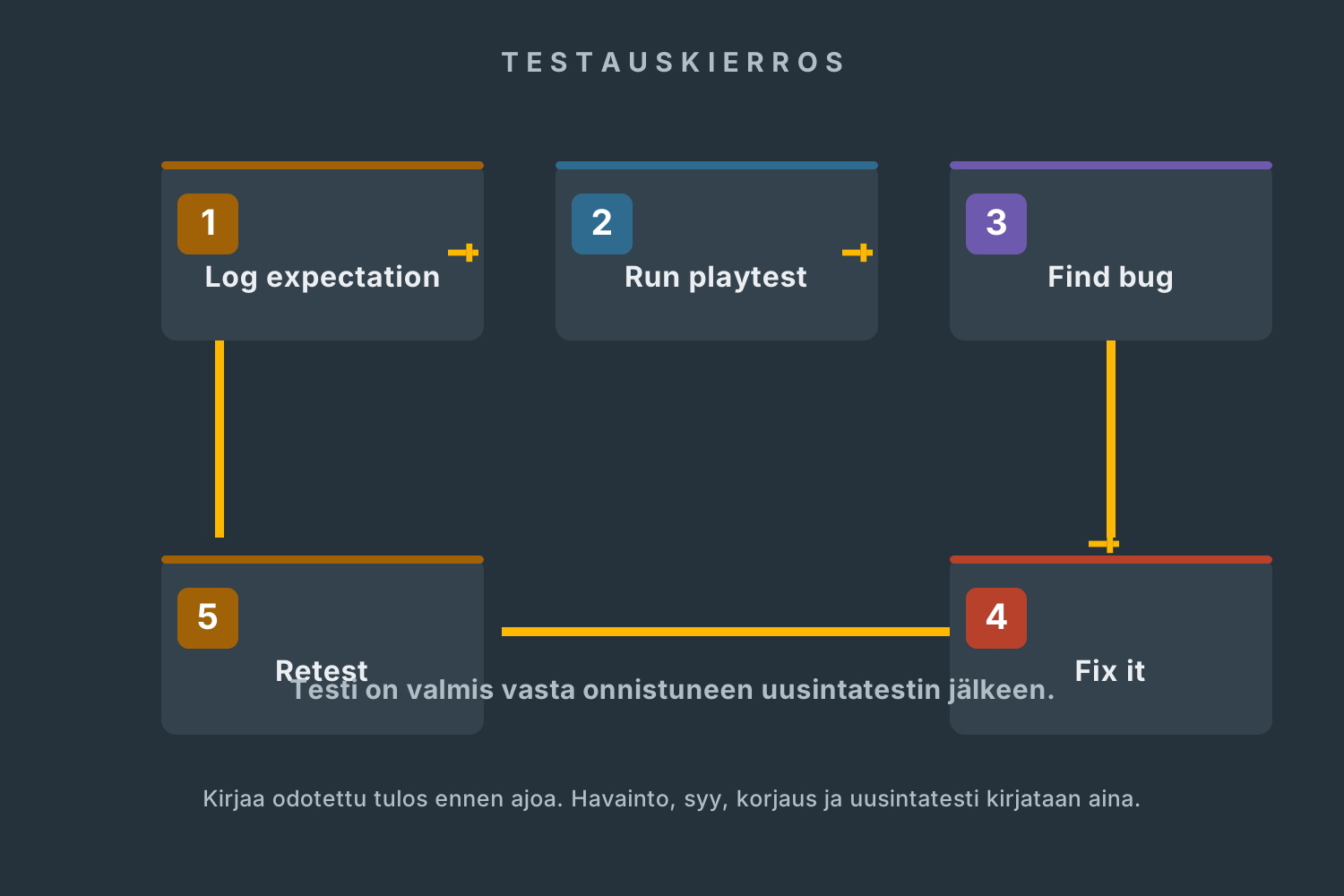
A test is only finished after a successful retest.
Test like a developer
Testing is not just playing with a friend. Record the expected result, the observed result, the cause of the bug, the fix and the retest.
At least 12 planned test cases with the expected result recorded before the run — the numbered test cases (T01, T02, …) from the feature weeks count (14+ in the plan).
3 complete debugging chains. A debugging chain is one bug written up end to end: observation → reproduction steps → cause → fix commit → retest → regression test.
Test classes in roughly equal thirds: normal use, boundaries and error cases — the GDD's own risks first: collision accuracy, spawn fairness, the 5 s rule, despawn timing and power-up frequency.
The release is tested in a clean environment, on a machine that has never had the project on it.
Glossary · for looking things up
Terms used in this project
Every term is also explained where it first comes up. Come back here whenever an identifier or an abbreviation slips your mind. The glossary lists only the terms this project actually uses.
Released work
Gallery
Finished v1.0 releases are added here in week 48: name, screenshot, licence and the release link.
The first releases are published in week 48.
Phase 1 · Core · Week 36 · 31 Aug – 4 Sep
GDD into tasks, project set up
After this week
From the brief – the client's wish this week fulfills
Finished this week
Why this matters
This week's tech
Weekly tasks
0 / 4
How to proceed
guided work · do in order
1Step. Filled from data.
I need implementation helpopen only if you get stuck – try it yourself first
Weekly day rhythm
Done when
Before you continue: check the week's done-when condition.
Show
A public repository whose README, P0 milestone and first commit say what is being built — plus the question list with answers and the meeting note in project-docs.
Weekly project journal
This is the journal's only place to write: three questions at the end of the week. The fields are stored only in this browser — the download and the state of recorded weeks are in the Project journal view.
Not written yet
Phase 1 · Core · Week 37 · 7–11 Sep
Tanks move — two players, one keyboard
After this week
From the brief – the client's wish this week fulfills
Finished this week
Why this matters
This week's tech
Weekly tasks
0 / 3
How to proceed
guided work · do in order
1Step. Filled from data.
I need implementation helpopen only if you get stuck – try it yourself first
Weekly day rhythm
Done when
Before you continue: check the week's done-when condition.
Show
A playable build with two tanks moving, test cases T01–T02 with results in tests.md, and the movement commits.
Weekly project journal
This is the journal's only place to write: three questions at the end of the week. The fields are stored only in this browser — the download and the state of recorded weeks are in the Project journal view.
Not written yet
Phase 1 · Core · Week 38 · 14–18 Sep
The bouncing shell
After this week
From the brief – the client's wish this week fulfills
Finished this week
Why this matters
This week's tech
Weekly tasks
0 / 4
How to proceed
guided work · do in order
1Step. Filled from data.
I need implementation helpopen only if you get stuck – try it yourself first
Weekly day rhythm
Done when
Before you continue: check the week's done-when condition.
Show
A video or image sequence of the ricocheting shell, test cases T03–T05 with results, and the Projectile prefab commit.
Weekly project journal
This is the journal's only place to write: three questions at the end of the week. The fields are stored only in this browser — the download and the state of recorded weeks are in the Project journal view.
Not written yet
Phase 1 · Core · Week 39 · 21–25 Sep
Rounds, scoring and the five-second rule
After this week
From the brief – the client's wish this week fulfills
Finished this week
Why this matters
This week's tech
Weekly tasks
0 / 3
How to proceed
guided work · do in order
1Step. Filled from data.
I need implementation helpopen only if you get stuck – try it yourself first
Weekly day rhythm
Done when
Before you continue: check the week's done-when condition.
Show
A whole round without the editor: scoring, the 5 s rule tested (T06–T08) and the playtest note week39.md.
Weekly project journal
This is the journal's only place to write: three questions at the end of the week. The fields are stored only in this browser — the download and the state of recorded weeks are in the Project journal view.
From the brief – the client's wish this week fulfills
Finished this week
Why this matters
This week's tech
Weekly tasks
0 / 4
How to proceed
guided work · do in order
1Step. Filled from data.
I need implementation helpopen only if you get stuck – try it yourself first
Weekly day rhythm
Done when
Before you continue: check the week's done-when condition.
Show
The written data store comparison, the paper drawing of the depth-first search, generated mazes and test cases T09–T10.
Weekly project journal
This is the journal's only place to write: three questions at the end of the week. The fields are stored only in this browser — the download and the state of recorded weeks are in the Project journal view.
Not written yet
Phase 2 · Arena & powers · Week 41 · 5–9 Oct
Power-ups and the HUD
After this week
From the brief – the client's wish this week fulfills
Finished this week
Why this matters
This week's tech
Weekly tasks
0 / 3
How to proceed
guided work · do in order
1Step. Filled from data.
I need implementation helpopen only if you get stuck – try it yourself first
Weekly day rhythm
Done when
Before you continue: check the week's done-when condition.
Show
Three power-up assets as data, a HUD screenshot and test cases T11–T12 with results.
Weekly project journal
This is the journal's only place to write: three questions at the end of the week. The fields are stored only in this browser — the download and the state of recorded weeks are in the Project journal view.
Not written yet
Phase 2 · Arena & powers · Week 42 · 12–16 Oct
Autumn break
No project work and no replacement tasks. Continue in week 43 from the last working version on main, the repository's main line of work — and remember that the client review is immediately after the break.
Phase 2 · Arena & powers · Week 43 · 19–23 Oct
Client review and prioritisation
After this week
From the brief – the client's wish this week fulfills
Finished this week
Why this matters
This week's tech
Weekly tasks
0 / 3
How to proceed
guided work · do in order
1Step. Filled from data.
I need implementation helpopen only if you get stuck – try it yourself first
Weekly day rhythm
Done when
Before you continue: check the week's done-when condition.
Show
The review note in the client's words, the recorded prioritisation decision and the updated implementation plan.
Weekly project journal
This is the journal's only place to write: three questions at the end of the week. The fields are stored only in this browser — the download and the state of recorded weeks are in the Project journal view.
Not written yet
Phase 3 · Complete game · Week 44 · 26–30 Oct
Feedback change and the chosen extra feature
After this week
From the brief – the client's wish this week fulfills
Finished this week
Why this matters
This week's tech
Weekly tasks
0 / 4
How to proceed
guided work · do in order
1Step. Filled from data.
I need implementation helpopen only if you get stuck – try it yourself first
Weekly day rhythm
Done when
Before you continue: check the week's done-when condition.
Show
A merged PR that references the feedback, the playable feature, the playtest note and test cases T13–T14.
Weekly project journal
This is the journal's only place to write: three questions at the end of the week. The fields are stored only in this browser — the download and the state of recorded weeks are in the Project journal view.
Not written yet
Phase 3 · Complete game · Week 45 · 2–6 Nov
Testing week and pair debugging
After this week
From the brief – the client's wish this week fulfills
Finished this week
Why this matters
This week's tech
Weekly tasks
0 / 4
How to proceed
guided work · do in order
1Step. Filled from data.
I need implementation helpopen only if you get stuck – try it yourself first
Weekly day rhythm
Done when
Before you continue: check the week's done-when condition.
Show
The run test matrix (≥12 rows), three complete debugging chains and the pair debugging note.
Weekly project journal
This is the journal's only place to write: three questions at the end of the week. The fields are stored only in this browser — the download and the state of recorded weeks are in the Project journal view.
Not written yet
Phase 3 · Complete game · Week 46 · 9–13 Nov
Menus and settings
After this week
From the brief – the client's wish this week fulfills
Finished this week
Why this matters
This week's tech
Weekly tasks
0 / 3
How to proceed
guided work · do in order
1Step. Filled from data.
I need implementation helpopen only if you get stuck – try it yourself first
Weekly day rhythm
Done when
Before you continue: check the week's done-when condition.
Show
The playable menu path, PlayerPrefs settings persistence (T15) and the duplicate colour block (T16).
Weekly project journal
This is the journal's only place to write: three questions at the end of the week. The fields are stored only in this browser — the download and the state of recorded weeks are in the Project journal view.
Not written yet
Phase 4 · Release · Week 47 · 16–20 Nov
Release candidate, external testing and security
After this week
From the brief – the client's wish this week fulfills
Finished this week
Why this matters
This week's tech
Weekly tasks
0 / 4
How to proceed
guided work · do in order
1Step. Filled from data.
I need implementation helpopen only if you get stuck – try it yourself first
Weekly day rhythm
Done when
Before you continue: check the week's done-when condition.
Show
The RC build, the written guide, the tester's findings by role and the security review with references.
Weekly project journal
This is the journal's only place to write: three questions at the end of the week. The fields are stored only in this browser — the download and the state of recorded weeks are in the Project journal view.
Not written yet
Phase 4 · Release · Week 48 · 23–27 Nov
Release v1.0 (the MVP)
After this week
From the brief – the client's wish this week fulfills
Finished this week
Why this matters
This week's tech
Weekly tasks
0 / 3
How to proceed
guided work · do in order
1Step. Filled from data.
I need implementation helpopen only if you get stuck – try it yourself first
Weekly day rhythm
Done when
Before you continue: check the week's done-when condition.
Show
GitHub Release v1.0, the clean-environment test report and the final README + LICENSE.
Weekly project journal
This is the journal's only place to write: three questions at the end of the week. The fields are stored only in this browser — the download and the state of recorded weeks are in the Project journal view.
Not written yet
Phase 4 · Release · Week 49 · 30 Nov – 4 Dec
Handover week
After this week
From the brief – the client's wish this week fulfills
Finished this week
Why this matters
This week's tech
Weekly tasks
0 / 3
How to proceed
guided work · do in order
1Step. Filled from data.
I need implementation helpopen only if you get stuck – try it yourself first
Weekly day rhythm
Done when
Before you continue: check the week's done-when condition.
Show
The finished project documentation, the collected journal and AI log, and the self-assessment in project-docs.
Weekly project journal
This is the journal's only place to write: three questions at the end of the week. The fields are stored only in this browser — the download and the state of recorded weeks are in the Project journal view.
Not written yet
GDD → implementation plan · draft in week 36, revisit in week 43
From the GDD to a buildable plan
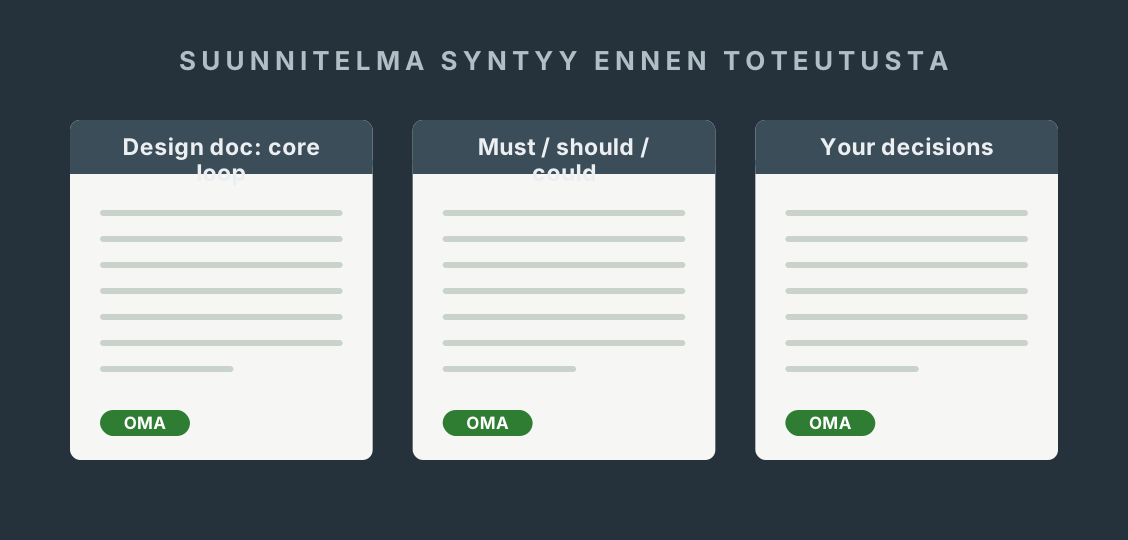
The Game Design Document is already written — you do not write it again. This form derives an implementation plan from it: the P0 scope (the required core), your own technical decisions with reasoning, and the things to agree with your instructor. The pre-filled sections are taken from your GDD.
Timing: fill this in during week 36, alongside the backlog — the list of issues still to do, in priority order. Come back to it in week 43, once the review prioritisation decision has been made.
A GDD is not a task list. It only becomes buildable once the features have been prioritised and spread across the weeks.
Pre-filled · included in the downloaded file
Requirement · from your GDD
1 · Core of the game (from the GDD, chapters 1–2)
Ping Pong Tanks is a two-player top-down arena game on one keyboard. The tanks fire bouncing shells inside a procedurally generated maze. One hit destroys a tank; the survivor scores a point; if both are destroyed within 5 seconds, no point is awarded. One shell per player, lifetime about 10 s.
Requirement · scope rule from the brief
3 · P1 and P2 reminder
The remaining GDD power-ups, special tiles, themes, audio and online play are not part of the MVP without the week 43 prioritisation decision. They live as issues, not in the plan.
Agreed way of working
5 · Game team and weekly meeting
Weekly meeting on Mondays (15 min): what got finished, what is happening this week, what is stuck. The agreements go into the issues they concern. A note in project-docs/meetings/ only when a work step asks for one.
Requirement · from your GDD
6 · Controls (GDD, chapter 3)
Player 1: WASD + Space · Player 2: arrow keys + M. Player 2's fire key may change based on playtests — record the change in the plan and in the GDD.
Agree with your instructor
7 · Open items — owned by the instructor
Unity version, licence, release channel and the author name in the public repository. An empty field goes into the file marked "NOT AGREED YET — open item".
You do not decide these yourself or with AI — you ask your instructor.
One place to write · pushed to Git every week
Project journal
The week's entry is written in the week view, under the tasks. This view is an archive: see which weeks are recorded and download the whole journal as a file.
0 / 13 weeks written
File: project-docs/project-journal.md
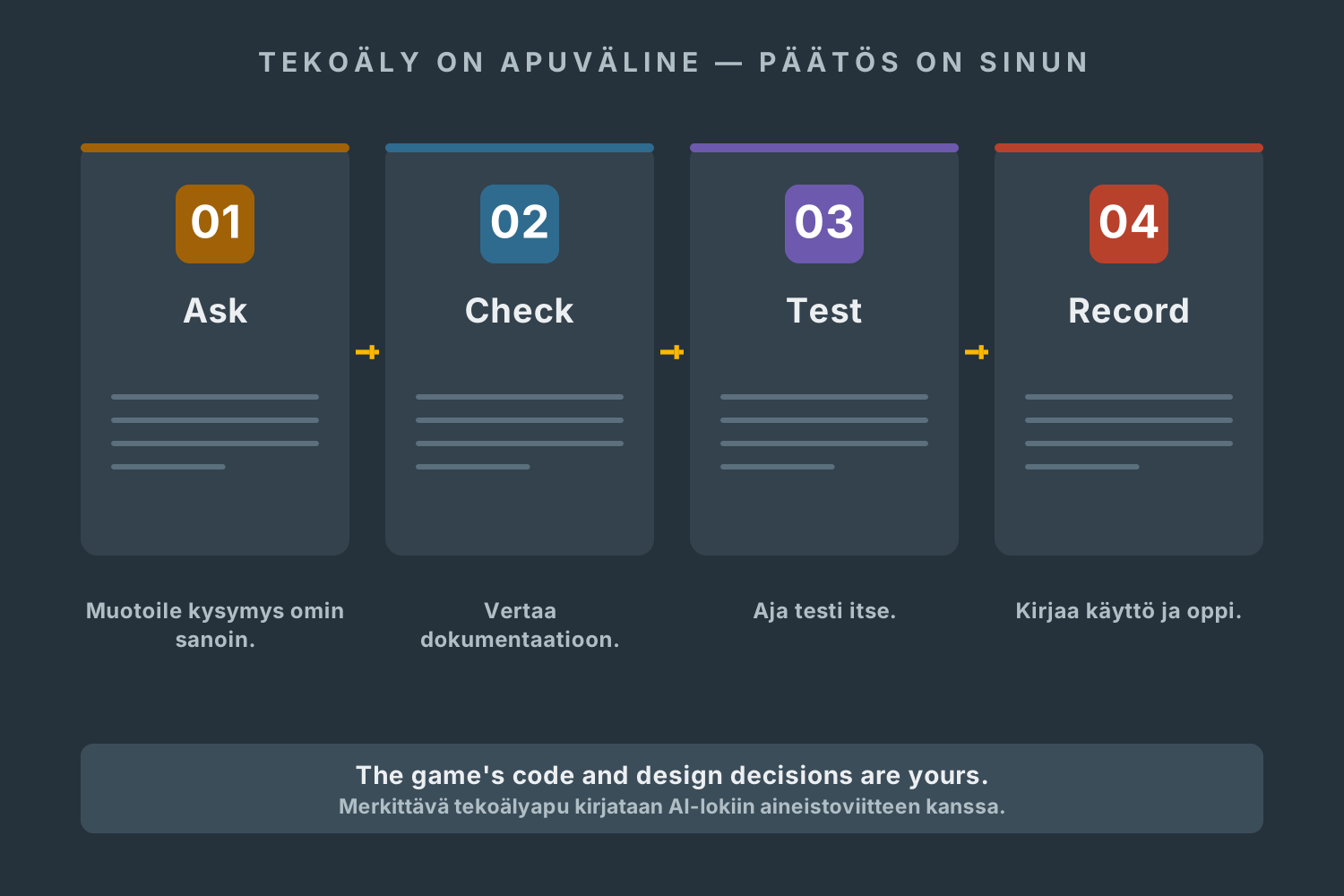
AI is an allowed tool · understand, check, test, record
You make the decisions. AI is a tool.
You may use AI to explain error messages, unpack Unity concepts and generate test case ideas. The game's C# code, the game design decisions and the test results are the core of this project — you produce those yourself. Every significant use of AI goes into the AI log with a reference.
Ask → check → test → record and learn.
01
Understand
Explain in your own words what the solution does and why it fits your game and its components.
02
Check
Compare it against the Unity documentation and your own GDD. AI can invent fields and commands that do not exist.
03
Test
Run the tests yourself. Never invent test results or feedback.
04
Record
Note the significant use, your own changes, and what you learned.
0 entries · the log is included in the whole project journal download.